20 posts
I just bought a Scarlette 2i2 to play around with. I was wondering if I can somehow play my mp3 player through it. I tried connecting to a line but I couldn't make it play for some reason. I know nothing about these things. Thanks for any help.
I bought it to have a cleaner signal through my monitors. Mainly for a volume knob, cleaner sound, when playing music through my monitors. Just playing music in general.
you probably need to use some kind of software setup thing to get the two channels panned left and right and unmuted when not recording - then some adapters to go from stereo mini to split 1/4" plugs.
like this: http://www.musiciansfriend.com/accessories/hosa-stereo-y-cable-mini-male--2-1-4-mono-males
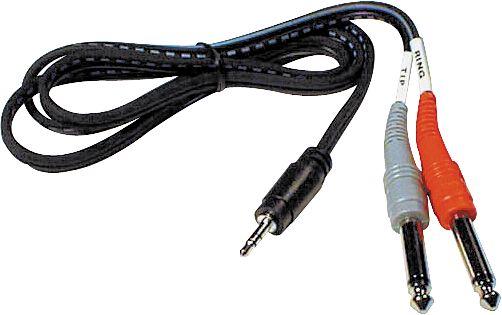
You were right. Lines were muted, period. Had to go into the software part and crank up the volume.
This is sweet. S much better sound than a mixer. I can't believe the difference. I have a pair of KRK Rocket 5's and they've never sounded so good!!!!
Thanks Man!!!
yep, I had the same confusion when I first got my firewire interface. rock on, er, blues on! ;)
This software is damn hard to figure out. My music plays fine out of the computer, but seems less quality out of one of the inputs.
Turn the volume up on mp3 player, clips like crazy. Turn the volume all the way down on mp3 player, gain all the way up, sound quality suffers. What the heck?? Other than I have no idea how to use this thing. ;D
"4. LINE/INST - Line/Instrument level switches for each input switches gain to suit instrument or line level signals"
I'd experiment with that. clipping probably means you're driving an instrument input with line level.
PS: read the manual! ;) :D
ironsheep — Mar 03, 2013PS: read the manual! ;) :D
RTFM? :D

I have a ipod classic. I have a sendstation line out thing for it.
xlr to mono 3.5 to classic. = Steady clipping. Even with the gain all the way down.
2 quarter in jacks to one 1-8th inch to ipod= better, gain in center but have to turn it all the way up if I listen loudly. And that have them in 2 seperate channels so I have to eyeball the gain Swiches, 2 of them.
I have the line switch on line, not inst. The ipod isn't a inst., I haven't had that much to drink.... yet. ;D
I think I'll just return it and go back to the mixer. So, Soooooo, much easier to deal with.
It's a shame they don't make a quality, simple, volume knob for monitors. It's a pain to use an iPod, or mp3 players, volume controls. So I have a mixer I'm using as a volume knob. ;D I got a usb mixer. Problem is, to change from mp3 player/cd player etc, there is no switch to change that. I have to unplug the usb cable to use a line for anything other than the computer.
Hell. Why didn't I think about it? I can use my portable headphone amp as a volume control. Trying it out now.
Hookbender — Mar 04, 2013I have a sendstation line out thing for it.
sound quality aside, can you get the volume levels you want if you send it signal from the headphone jack instead?
as far as the mixer stuff... maybe look for something with more inputs so you can leave things hooked up.
Yes. Clipping area though. Adjust the gain, all that stuff. Just to complicated. I just need a dam volume knob that has no power, passive. Plug the monitors to that and your source, and adjust the volume at will, real easy and accurate like. I can't believe there is nothing out there like that.
there must be an easy way to do that! heh, can't think of one though... I'll post anything I come across.
Headphone output is neither an instrument level nor a line level input. It's got some power behind it. You're going to need to gain stage appropriately; generally that means running the output on the ipod at a level that is as loud as line level... I'm not sure where that is but I know ipods get pretty loud... and then setting your inputs on the Focusrite box to get that level right. Are you monitoring through some sort of software?
charger — Mar 04, 2013Headphone output is neither an instrument level nor a line level input. It's got some power behind it. You're going to need to gain stage appropriately; generally that means running the output on the ipod at a level that is as loud as line level... I'm not sure where that is but I know ipods get pretty loud... and then setting your inputs on the Focusrite box to get that level right. Are you monitoring through some sort of software?
Yeah. The Scarlette 2i2 came with software, but I'll be damed if I can fix the problem with it. I have no doubt that I haven't a clue, pretty much, as to what I'm doing. When I use the line out from the ipod and go to the line input on the scarlet, the signal is way to hot. It maxes out the line instantly. The only way I can get all the levels right is to adjust the volume on the monitors, adjust the gain on the Scarlette. Thats just to damn complicated. I don't have that problem at all when listening to music on my computer, it's just when I try to connect another source.
I simply can't believe someone doesn't make a volume control that is super clean and is used to solely adjust the volume on monitors. I returned a pair of m-audio AV-40's and bought KRK Rocket 5's and I'm beginning to wonder if that was a mistake. The AV 40's had a volume control but were colored as hell and not at all accurate. I'm kinda weird. When I listen to music, I listen to monitors only when at home. I've been spoiled by them. On the computer, the F. Box sounds damn good, even listening to Spotify or Pandora. Amazing difference over the sound strait from my macbook pro. I just wish I could fix the issue of connecting other sources somehow.
http://www.fullcompass.com/product/381651.html?utm_source=googleps&utm_medium=shopping&utm_campaign=googleps&gclid=CODj0Zvo6LUCFa9aMgod9wMAIw
Passive volume knob. Great price... sure, it's basically just a stepped resistor, but I couldn't build it this cheap... a nice stepped stereo switch costs me about $100, and then I have to install high precision resistors. And look at all the i/o...
Freaking perfect. You are the man. Thanks Charger. I just ordered it. Really appreciate that!!! :)
Charger
This little box is exactly what I wanted and works like a charm. Extra clean signal and easy to hook up any source. Built like a tank. Thanks again. Works perfect!!!! Now I can really hear what my monitors sound like with no unwanted distortion or noise.
Cool, glad to hear it. SM Pro Audio is one of those eastern manufacturers that seems to have all their ducks in a row and makes good stuff for good prices.
You know, folks at guitar center really just don't get it at times. I had to return some cables today and I told them about the nano patch and the fucker went straight to it on the shelf. After telling three dudes exactly what I was looking for, they didn't even bother bringing this item up. Damn. Oh well. I have it and it's perfect!!
Just got this today.....
http://www.headphone.com/headphone-amps/headroom-micro-dac.php
This and the Nano Patch Charger suggested for a volume control, KRK monitors, Pay for premium spotify for internet music and and boom. Sounds pretty good. The dac is so much better than my Macbook pro computer. Might want to check this out if you play a lot of computer based music.