The Watering Hole

Computers & Technology
11 posts
I thought I'd share some tips on what IMHO is some of the best free software around to keep your computer running smoothly.  

I've just started to use the Piriform Defraggler...brilliant, free program that's fully Windows compatible, made by the company that does CCleaner.  

It has: -

1. Option to defrag only fragmented files, instead of having to do the whole disk

2. Advanced options to defrag free space

The full defrag takes a while, but unlike windows defrag, it properly compacts your hard disk,and gets rid of all the 'gaps' (shown as white lines in the windows version).  If you 'analyze' the disk with the Windows tool after Defragger has done its work, you'll see the difference.   It's every bit as good as disk-keeper 8 ...except its FREE.  

And of course the best free cleaner around is the Piriform CCleaner. All the piriform products are here.  

http://www.piriform.com/products

Another smashing little freebie is the Auslogics registry defragmenter tool - it safely defrags your registry (which a normal defragger doesn't) and you'll be impressed at the difference.  It does require a reboot, but you'll only need to run this very infrequently - you can also just 'analyze' to see if it needs doing (no reboot needed).  

http://www.auslogics.com/registry-defrag

Auslogics also do a free defragmenter - it's a good program, but I think the Piriform is better

http://www.auslogics.com/disk-defrag

Easy Cleaner has a nice function to get rid of unnecessary files (but its registry cleaner is pretty naff).  

http://personal.inet.fi/business/toniarts/ecleane.htm

Windows Defender is anti-spyware that runs in the background & although I've other antispyware too (eg Adaware) since I've been using 'Defender' they're redundant - nothing of any note gets past this baby!

http://www.microsoft.com/windows/products/winfamily/defender/default.mspx

Finally, if you want an excellent free antivirus, you can do no better than AVG Free

http://free.avg.com/ww.download-avg-anti-virus-free-edition

Just thought I'd share!

Rich :)
Not a word for Spybot ??   ;) ;)
Avast! Home edition anti-virus is also on my list.  I had to stop using AVG because they killed off support for AVG Free 7, and my work VPN connection didn't support AVG8 quickly enough.  Avast! has the advantage that you can use it on more than one computer on your home.  In fact, you can use it on more than one computer in your home with the same serial number.  Very nice.

http://www.avast.com/eng/avast_4_home.html


I also like TreeSize Free... a very handy tool to view the sizes of folders, and folder hierarchies, on your computer. It doesn't sound that exciting when you describe it, but once you start using it, you will wonder how you got along without it.

http://www.jam-software.com/freeware/index.shtml


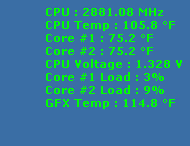
And PcWizard... a cool way to look into what's going on on your system.  And when you minimize it, it overlays these cute little system usage stats in the upper right corner of your desktop... (see pic).

http://www.cpuid.com/


Glary Utilities is like all the tools of Norton, but without weighing the shit out of your system.  And free.

http://www.glaryutilities.com/


For FTP, I haven't found a better client than FileZilla.  Even compared to paid options, which I used to use, FileZilla kills them all.  Its queuing system is brilliant, and it has the easiest CHMOD UI I've seen. Plus great support for all the wierd oddities out there: passive transfers, forced ASCII vs. binary, all kinds of password options.

http://filezilla-project.org/


For writing a screenplay (not sure if any of you are doing this...), Celtx is absolutely brilliant.  My friend and I are cowriting a screenplay and we can not only work in the same free tool on Mac and Windows, but we can upload and download the script whenever we make changes, to a free, secure online repository.  Excellent!

http://www.celtx.com/


And, of course, OpenOffice.org.  What can be said about a tool that supports the Open Document Format, and can natively read and write Microsoft Office formats, is cross-platform, open source, free, and about 1/5 the size of MS Office?  Fantastic.  I hope to never use Word again.  I'm even using OpenOffice at work, where we have MS office licensed.

http://www.openoffice.org
what about reg cleaners?  

RegscrubXP for example.  

Or "autoruns" for XP.  
DreamTheaterRules — Aug 25, 2008what about reg cleaners?  

RegscrubXP for example.  

Or "autoruns" for XP.  

Good question.  You have one to recommend?  
well, I use RegScrubXP.  Just wondering if there was something better.  I know it cleans up stuff every time I run it.  
Update:

I am switching from AVG to Avira AntiVir.  After a few months of looking around, and testing out a few programs, I think this is the new free virus software to beat.

Here's a pretty good roundup from Tom's Hardware:
http://www.tomsguide.com/us/2009-antivirus-test,review-1315.html

Avira Antivir Personal:
http://www.free-av.com/en/products/1/avira_antivir_personal__free_antivirus.html
Malwarebytes is a must to get rid of particularly tenacious virus/spyware infections.
You have to pay for  realtime protection - so AVG trumps it on that
but the free version of mbam is way sharper  than AVG at removing crap once you have been infected.

http://www.malwarebytes.org/mbam.php
I have Norton 360, which I know you don't like, but....

If I used the defrag and registry cleaner mentioned above, would it mess up my computer? Norton has that already, so do you recomend I try it still, or just let Norton do it's thing?

Thanks!
No, using other tools won't mess up your computer.  Norton most likely won't care.  Norton and McAfee are not as bad as they once were.  What I dislike the most about them, honestly, is the constant licensing fee.  Renewing that shit every year just gets old to me.  At least they should say "ok, you've been with us for five years, here's the next year free" or something.
Wow, talk about a lifesaving product.

CloneZilla.  http://clonezilla.org/
Easeus Partition Manager.  http://www.partition-tool.com/


Recently, my main system started choking... slowing way down.  We're talking ten minute boot times, extremely lagging system operations, etc.  On a hunch, knowing that I had an ancient hard drive partitioned to make my C: and D: drives, I ran an online scan of the drive using SpeedFan and found that the drive was failing, with a 0% drive reliability index.  Replace immediately was the recommendation. This drive had been running in my current computer and before that, in the previous computer for almost 4 year, and there was something around 1 GB of free space left on the C: drive.  Things were going downhill, and fast.

Since my main drive was 160GB, I went out to buy a replacement drive and thought I would move so each partition now had 250GB--a 500GB drive, $80 everywhere.  I connected the second drive via USB with a drive dock I have, and then the fun started.  First I tried to copy the entire disk, while enlarging the partitions, using Easeus Partition Manager.  This is something that this tool can do easily... when the drive isn't fucked.  Instead, the copy process would go for an hour, then fail, on different files every time.  

Finally, I went through the directions at clonezilla's site.  Clonezilla ($0) is unique because it uses a similar data copying method to Norton Ghost, where it copies a drive sector by sector, but it doesn't run in Windows... it runs in its own version of Linux, booted off a CD-R.  To get to this point, I had to build a boot CD (using the ISO image from clonezilla and following their instructions step-by-step).  I have to warn you that it's not for the faint of heart, doing something like this.  If you choose the wrong drive at any step of this process, you will wipe out all your data.  That said, clonezilla gives precise directions for all sorts of operations, including partition backups, disk backups, restoring from various backups, and disk-to-disk copies on the CloneZilla site.  Just choose the "Clonezilla live" direction path and follow the disk-to-disk instructions and it's not all that difficult.  Making it easier was the fact that I had only one drive of the 160GB size, and it had partitions called System and Data, so it was easy to make sure I was copying from the right disk... then the 500GB disk was empty, so that was easy to identify too.  

So, boom, I went with the disk-to-disk copy instructions, and it worked great... 30-something minutes to go transfer about 140GB to a USB drive.  Clonezilla prompted me along the way, to do things like copying the boot loader (required to use this as the boot drive for the system) and gave me plenty of opportunites to back out.  I went ahead and cloned, and it worked flawlessly where the Easeus tool had not.

So I took out the old drive, put the new drive in its place, and booted, and everything was great... except for one thing.  Clonezilla had copied the drive exactly, and partitioned only 160GB of my 500GB drive. (I have since learned there are expert options for Clonezilla that allow you to pre-partition the target drive, then copy the source drive partitions to the target's existing partitions... but I didn't check on that then)...

So now I used Easeus Partition Manager ($0) to enlarge the two existing partitions on the drive, both to around 250GB.  This took about twenty minutes and was about as easy as it gets.

Voila, two new partitions of 250GB, all my data safe, my system booting like nothing had changed... well worth the cost of the tools ($0 total) and the drive ($80).